
xCoin · MetalDAG · post-quantum from block 1
Learn to mine by mining.
Press start and this browser does real MetalDAG proof-of-work: a learning tool, a few hundred hashes a second on CPU, not a block finder. Mainnet has been live since September 26, 2026, 00:00 UTC, explorer at superknet.com. Paste a mainnet address (xpa1r…) and press start; a block it finds pays that address. For real hashrate, mine with MMM on your Mac: the recommended miner, native Metal on Apple Silicon, same pool, same address.
Network status
mainnet · reading superknet.com
Live mainnet figures from the explorer at superknet.com. Nothing here is simulated.
Mine with MMM on your Mac.
the recommended miner · open source · Apple SiliconMac Metal Miner
MMM is the native Mac miner for xCoin: the full 4 GiB MetalDAG on the GPU in unified memory, a dashboard with hashrate, shares and blocks, a menu-bar pickaxe, and a wallet tab. It checks the mainnet genesis against the explorer before it starts. No seed phrase, no private key: MMM only needs the address it pays.
In MMM, open Setup and enter:
Network   Mainnet
Explorer  https://superknet.com
Pool      pool.xcoinminer.com   (or 172.96.186.49)
Port      3335
Worker    any name, e.g. mymac
Password  leave blank
Payout    your xpa1r… address
Press Start Mining. Your rig appears on the superknet.com miner list within a minute. No Mac? The browser rig below mines the same pool.
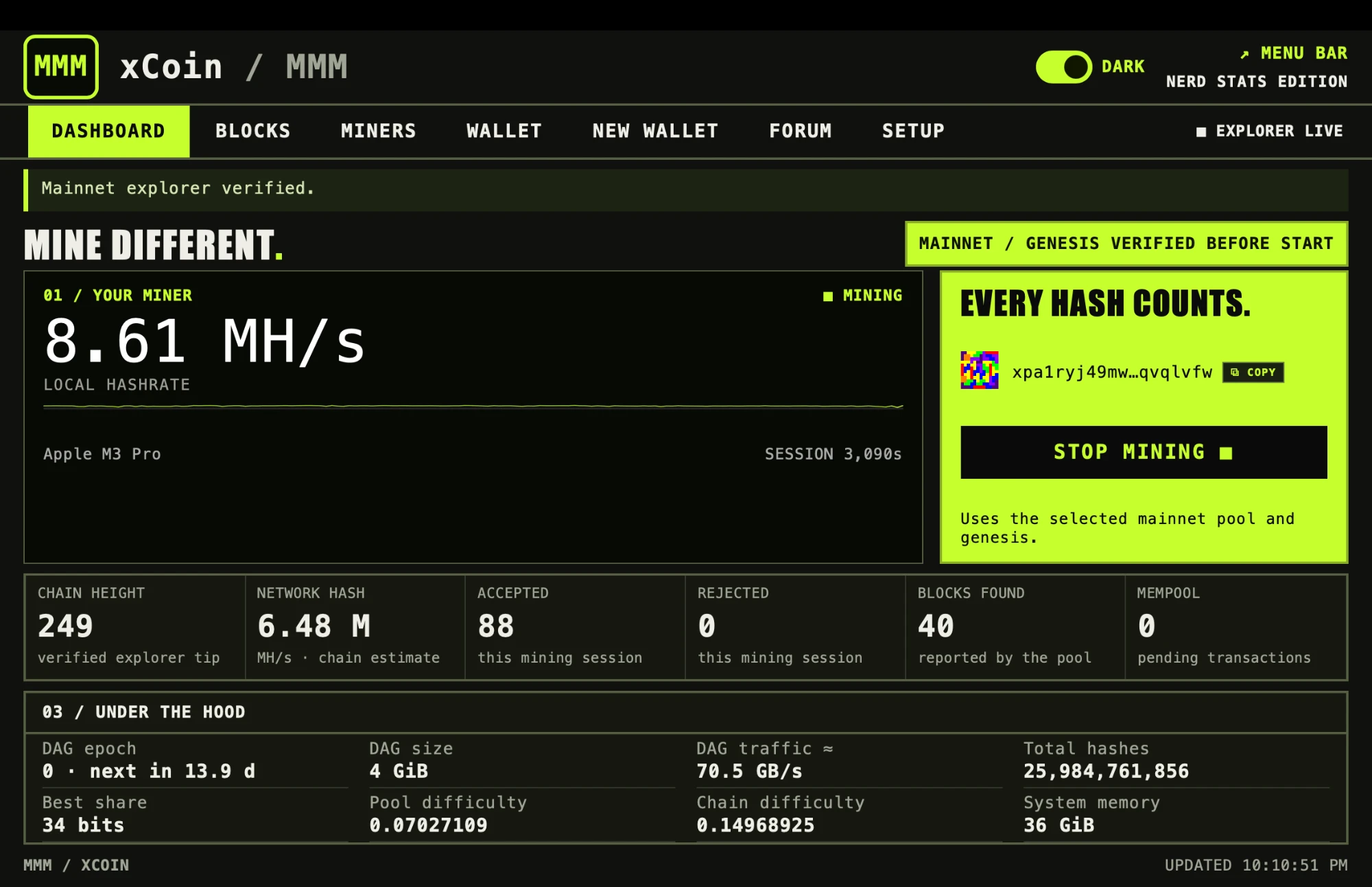
MMM on mainnet: a real session on an Apple M3 Pro, 8.61 MH/s. Hover to magnify; click for the GitHub repo. The download is the ready-to-run app for Apple Silicon Macs (M1 or newer, about 1 MB): unzip, move MMM to Applications, and the first time right-click it and choose Open. Release notes and checksum.
Paste a mainnet address (xpa1r…) and press start: this tab joins the mainnet pool as web-solo-NNNNN. Leave it blank to just try it (learn mode, no rewards). Get an address →
STATUS: mainnet has been live since September 26, 2026, 00:00 UTC, explorer at superknet.com; testnet A is retired. This page is a learning tool: a few hundred hashes a second on CPU, not a block finder. With no address it runs the learning benchmark: real MetalDAG work, no shares, no rewards. Mainnet addresses read xpa1r….
What your machine is actually doing
the whole thing, in four stepsGet a job
The pool hands your browser a block template: the last block's hash, the transactions to include, and a target the hash has to beat.
Walk the DAG
For every guess, MetalDAG reads 64 random 128-byte items from a dataset that starts at 4 GiB and grows 128 MiB every 14-day epoch, and mixes them. The cost is memory traffic, not arithmetic.
Submit shares
Any hash under the pool's easier target is a share: proof you did work. Shares are how the pool measures you.
Find a block
A hash under the network target is a block. The mainnet subsidy follows the Annual Tenth: 6.25 XID a block for the first 20,000 blocks, rising to 50 XID from block 60,001, then 10% less every 110,000 blocks, never below 1.5 XID. The pool is solo and coinbase-only: the block pays its whole coinbase to the address that found it.
MetalDAG, plainly
Bitcoin's puzzle fits in 80 bytes, so a chip that does nothing but SHA-256 wins. MetalDAG makes the puzzle touch a 4 GiB dataset on every guess, and the dataset grows 128 MiB every 14-day epoch. It is memory-hard: the cost is memory traffic, not arithmetic.
That is the one thing Apple Silicon is world-class at: one pool of very fast memory shared by CPU and GPU. MetalDAG is memory-hard and Apple-Silicon-favoring; that is the whole claim. The full deep dive, with benchmarks.
Why this browser is slow, on purpose
The browser uses the light path: a 32 MiB verification cache and recomputing dataset items on demand. Real and correct, and a few hundred hashes a second on CPU: a learning tool, not a block finder. The Mac app holds the whole dataset.
It exists so anyone can see mining happen without installing anything. When you want hashrate, the next section is for you.
Three ways in. Pick your level.
01 · Browser
This page. One tab, one click, nothing installed. Paste a mainnet address (xpa1r…) and press start: the tab joins the mainnet pool as web-solo-NNNNN, and a block it finds pays that address. Blank address: learn mode, no rewards.
The light path, a 32 MiB verification cache. It is a learning tool, a few hundred hashes a second on CPU, not a block finder.
Start above02 · MMM for Mac (recommended)
Mine with MMM on your Mac. Native Metal, the full DAG, 4 GiB at epoch 0, in unified memory. Setup: network Mainnet, explorer https://superknet.com, pool pool.xcoinminer.com port 3335, your xpa1r… address (below). Details above.
Get MMM on GitHubPrefer a terminal? NerdMiner runs the same work from the command line with that address, the mainnet pool, the mainnet genesis time, and a name for this rig (mymac here; pick any):
# address from the node wallet: ./nex-cli getnewaddress → xpa1r…
./NerdMiner xpa1r… --pool pool.xcoinminer.com:3335 --base 1790380800 --worker mymac
The dashboard shows your hashrate, the DAG epoch, accepted and rejected shares, best share, and blocks found. A block pays its whole coinbase to that address.
Get NerdMiner03 · Watch it anywhere
iPhone, Apple Watch, browser. NerdMiner MD in your toolbar, the iPhone app to start and stop your rig, and a buzz on your wrist when you find a block.
NerdMiner MDGet an address
An address is where a block's coinbase is paid. On mainnet it starts with xpa1r and comes from the wallet built into the xCoin node. Run a node first (build it from the repository, then nexd; it joins mainnet on port 9333), then ask its wallet, through the nex-cli that builds beside it:
./nex-cli createwallet mine
./nex-cli getnewaddress   → xpa1r… (mainnet)
Paste it into MMM's Setup, the browser rig above, or NerdMiner. Mainnet addresses start with xpa1r; xPay on iPhone makes one there. Both prefixes mean post-quantum: every spend is signed with a post-quantum key — ML-DSA-65 or SLH-DSA-SHA2-128s — and the network rejects anything else. Nothing to migrate later.
Your forum identity (xid1…) is a different key, made by the wallet CLI; NerdMiner login signs with it. Card wallets: an NTAG 424 DNA tap unlocks the key, which never touches a networked device.
Solo, coinbase-only
Solo is a lottery ticket. Rare, but a block is the whole subsidy, up to 50 XID on mainnet, and it is yours.
The pool is solo and coinbase-only: a block you find pays its coinbase straight to your address. No accounts, nothing held on your behalf, nothing split.
Testnet A is retired (ledger archived at height 3,555); its pool (browsers at wss://superknet.com/stratum, NerdMiner at 172.96.186.49:3335) is retired with it. Mainnet and its pool have been live since September 26, 2026, 00:00 UTC, explorer at superknet.com: stratum at pool.xcoinminer.com:3335 (172.96.186.49) for MMM and NerdMiner, wss://superknet.com/stratum for this browser rig.
NerdMiner MD. Your rig in the toolbar.
Chrome · Brave · Edge · FirefoxWhat it is
A toolbar window onto your NerdMiner rig and the #rigs chat at MineDifferent. Click the icon and you see the rig's numbers: hashrate, accepted shares, best share, DAG epoch, blocks found. The badge shows your hashrate, a desktop notification fires when you find a block, and the chat is right there.
It does not mine. Your Mac does the work; this is the window.
Before you start
NerdMiner 4.1 or newer on your Mac (get it above), a mainnet address (xpa1r…), and Chrome, Brave, Edge, or Firefox. Nothing else: no account, no token. NerdMiner 4.1 links to the extension on its own.
Five steps, in the order you do them. Ten minutes the first time.
Run NerdMiner 4.1
On your Mac, start NerdMiner 4.1 or newer with your mainnet address and the mainnet pool, and leave it running:
./NerdMiner xpa1r… --pool pool.xcoinminer.com:3335 --base 1790380800 --worker mymac
The extension reads this miner's numbers straight from your Mac. Start the miner first; the extension finds it on its own.
Download and unzip
Download nerdminer-md.zip and unzip it: double-click it in Downloads. It unpacks to a nerdminer-md folder. Keep that folder where it is; the browser loads the extension from it.
Load it unpacked
Chrome: open chrome://extensions, switch on Developer mode (top right), click Load unpacked, pick the nerdminer-md folder. Then click the puzzle-piece icon in the toolbar and pin NerdMiner MD so the badge shows. Brave and Edge: the same, at brave://extensions and edge://extensions.
Firefox: inside the folder, rename manifest.firefox.json to manifest.json. Then about:debugging → This Firefox → Load Temporary Add-on → pick that manifest.json. Temporary means Firefox drops it when it quits; load it again next time.
Click the icon
Click NerdMiner MD in the toolbar. Your rig's numbers appear within two seconds. There is no token to paste: NerdMiner 4.1 links to the extension on its own. Options is only for an older NerdMiner that asks for its companion token, or a changed --stats-port.
Sign in to chat
Reading #rigs needs nothing. To post, click Sign in in the popup: MineDifferent shows a one-time challenge, and on your Mac you run ./NerdMiner login <challenge>. It signs with your xCoin identity (xid1…, key index 101 by default); the wallet asks for its passphrase. No password anywhere.
Chat unlocks after one accepted share credited to that identity. Mine first, then sign in. Founders and mods are exempt.